
Had a problem with a customer today sending an email and instantly getting a response that the message was undeliverable, with the message:
Your message did not reach some or all of the intended recipients.
Subject: FW: Offer
Sent: 20/09/2011 10:33
The following recipient(s) cannot be reached:
‘[email protected]’ on 20/09/2011 10:33
None of your e-mail accounts could send to this recipient.
This problem is caused when the email address has been pasted into to the to: field with the mailto: portion still intact.
Go into the sent items and open the email that failed to transmit and then choose “resend this message” and then double click on the email address you will probably see something like this:
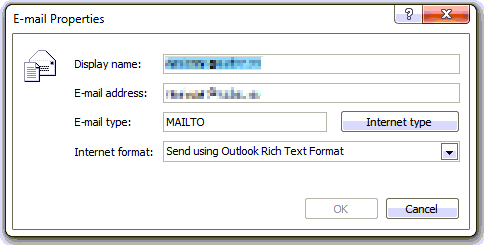
As in the picture the “E-mail type:” is set to MAILTO. Clicking on the Internet type button will reset it back to SMTP and should be able to send the message.
Sometimes the incorrect address can also get cached into your NK2 file, so you will need to remove it from your autocomplete cache to make sure that you don’t get the problem again.
James says
You’re my hero, had this exact problem on Tuesday!
From: System Administrator
Sent: 24 January 2012 16:38
Subject: Undeliverable: Introduction
Your message did not reach some or all of the intended recipients.
Subject: RE: Introduction
Sent: 24/01/2012 16:38
The following recipient(s) cannot be reached:
‘XXXXXXXXXXXXXX’ on 24/01/2012 16:38
None of your e-mail accounts could send to this recipient.
Crapface Joe says
Thanks for the suggestion. I had to delete my contact entry for the person and remake it (even though it had worked for a year) it must’ve been some kind of corruption. I noticed when I opened the contact entry to edit it it was also giving me another error about loading the contacts, but once I deleted this one contact and remade it my contact list was working properly again for everyone.
Lorene says
I have this problem but it is not caused by the problems listed above. I have had this person in my contact list for years and never had a problem. I never “paste” her address into the email form. The messages reached her for years and then suddenly she wasn’t receiving them and I was not receiving hers. I was going to get a gmail account so we could communicate again but I hate to have to do that when I feel it should work with Century Link. My address is [email protected] Hers is [email protected]
Bilal Al khayyat says
Go to >>>>> tools > Account settings > then double click on the email address > then click on More settings > click Outgoing server tap > then check the box “My Outgoing server (SMTP) … and leave the options the same as is and press OK.
Please when it is work pray for me or say GOD PLEAS YOU.
thanks
Bilal Al khayyat
Ambadas Bingi says
Thanks for the brief descriptive solution.It worked like a charm.
aaaaa says
I had this problem but it’s work thanks to you. But I think that I can’t receive emails from the contact that I had problem with. so how can I make sure that if he send me email I will receive it??
aaaaa2014 says
I had this problem but its work thanks to you. But I think that I can’t receive emails from the contact that I had problem with. so how can I make sure that if he send me email I will receive it??
syed kamran hassan shah says
Great…really appreciate
paul z says
I had a problem where I could not send to people I had been sending to for years. My solution was to delete my outlook cache and then find an email of theirs and reply to it. Then everything worked great.
faraz akhtar says
what can be problem.
Your message did not reach some or all of the intended recipients.
Subject: Control Orbits Co. (COC)
Sent: 31/03/2016 8:42 AM
The following recipient(s) cannot be reached:
‘Michael.McGregor@…..com’ on 31/03/2016 8:42 AM
None of your e-mail accounts could send to this recipient.
Sammy Msafiri says
God bless you Bilal Al khayyat. It worked for me too. Thank you very much.
Phuc Nguyen says
I solved it. In outlook 2010 Go to file > Account Settings > Email tabs click on repair button > choose “Manually configure sever settings or additional sever types” > next > Click “More settings” > Outgoing sever tabs > check ” My outgoing sever (SMTP) requires authentication ” > Click on ” use same setting as my incomming mail sever > ok > Next. it’s going to reconnect and send test email to sever. Then you can send your email. Before this i can only recieve email. Now sending is ok…
Interested Reader says
After a bit of experimenting, I discovered this to be a problem with my domain email account interface in that only email addresses entered into the email account Address Book can receive email from the account. Perhaps this is an anti-spamming feature which prevents lists of emails from being added to a corporate email, which makes perfect sense. If the problem is with just one email address, then assume that by adding it to your address book that your email program will recognize it as a legitimate address.
Adela says
I have the same error message which I had never got before:
“Your message did not reach some or all of the intended recipients.”
Some of the resolved methods offered here say to do something to the recipient, but in my case I have 50 recipients so I couldn’t possibly be doing it on each one. However, I’ll try some of the other suggestions and I thank all of you who cooperated in offering them. 🙂