
Dell Openmanage Server Administrator is a really useful tool for configuring and monitoring server hardware but it lacks built in E-Mail alerts.
It is capable of executing scripts when a server alert is triggered so I have written a simple script in VBScript that provides the missing E-Mail alert functionality.
Updated version of this script
Many people land on this page, while the script and instructions on this page still work, there is an updated post with new information, please see this post:
How to configure email alerts from Dell Open Manage
- Download the script
- Extract the contents of the zip file to a folder on your machine
- Edit the top of the script to make the SMTP settings appropriate for your environment:
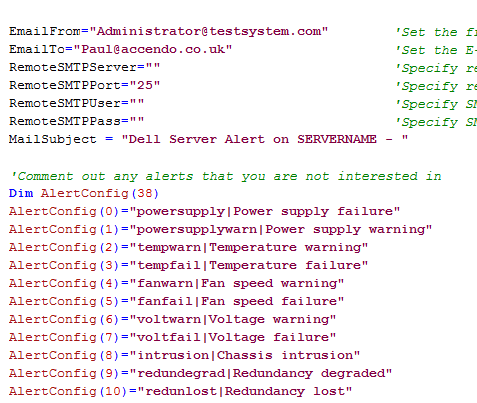
If a remote SMTP server is not specified the script will try to use the local machine to send the E-Mail. - Test the email functionality by running:
cscript dellalert.vbs testemail - Setup the alerts by running:
cscript dellalert.vbs setup - Once this is done you should be able to see that the script has been added into OMSA:

Now you need to generate some real alerts to test the script properly. How you do this will depend on the capabilities of your server, I was able to disconnect the redundant power supply and have an alert generated almost immediately. Opening the case will also generate an event on some servers. Hopefully you should get something like this in your Inbox:

Let me know how you get on and leave any questions in the comments area.
Chris says
Awesome tip Paulie, thanks! Can I bother you with a question? Can I add a 2nd email address to the EmailTo variable?
Paulie says
Chris,
Yes, add as many as you need, simply seperate them with a semicolon. e.g.
[email protected];[email protected]
SpX says
Hi,
This script is Awesome !!!! but is not working on Server Core (Hyper V Server r2)
It’s say (french translation): C:\DellAlert.vbs(87, 3) Erreur d’exécution Microsoft VBScript: Un composant Acti
veX ne peut pas créer un objet.: ‘CDO.Message’
Thx 😉
Paulie says
Done a few searches, reckon that it wont work in Server core because CDO isn’t included. Not sure of an easy way around this either. Part of the reason that I put the script together is so that it could work without any 3rd party components. But I think server core will need some external utility to make it work properly and then some reprogramming. I might have a look at it this weekend.
SpX says
Ok thx a lote Paulie 😉
Aaron says
Thanks, very nice work! We have had a need for this for quite some time. Quick question, I am receiving the emails when running the test but OMSA is not executing the script after an alert is generated.
Like you, I pulled a power cable to trigger an alert for lost power redundancy but didn’t get the email. I checked OMSA and it is enabled to execute the application for both power critical and warning and has the following path to the app: C:\WINDOWS\system32\cscript.exe C:\Program Files (x86)\Dell\SysMgt\DellAlert\dellalert.vbs email 0
Any ideas? Thanks in advance!
Paulie says
Not sure, I would suggest running the same command OMSA is running to check if that works, from a command line just run the same command that you quoted:
C:\WINDOWS\system32\cscript.exe C:\Program Files (x86)\Dell\SysMgt\DellAlert\dellalert.vbs email 0
Could be due to the spaces in the path name. Will try to emulate the situation on my system….
Try moving the script into a higher level directory like c:\dell\script, just as a test.
Aaron says
You are correct about the space. It worked when I updated the app path with quotes.
C:\WINDOWS\system32\cscript.exe “C:\Program Files (x86)\Dell\SysMgt\DellAlert\dellalert.vbs” email 0
If I move the script to a path without spaces and re-run cscript dellalert.vbs setup will it update all the paths in OMSA?
Again, thanks a lot for this script. This is great to have this feature without the cumbersome IT assistant.
Paulie says
Yes it will automatically update all the paths if you run it with the “setup” argument again.
I have just replciated the issue here. Am working on a fix right now which will hopefully make it work even with spaces in the pathname.
Aaron says
Great, thanks for the help. I’m sure you could edit the script to have the setup process add the quotes automatically. Adding quotes will work even in the path doesn’t contain a space.
Paulie says
Yes, I have just modified the script and retested it.
It should now work even if the path has spaces. Try it out and let me know how you get on. I have just re-uploaded.
Michael Winick says
Searched around all day for something like this. Best solution I’ve seen out there. Easy Setup– works fine on all my Dell Servers.
THANK YOU. THANK YOU. THANK YOU. THANK YOU. THANK YOU. THANK YOU. THANK YOU!!!
SpX says
Hi Paulie,
I would like to have a feedback about the script for server core ?
You have a solution ?
Best regards
Chris says
Hi Paulie,
This is a great little script! I just set it up and its working. I did a power supply test and it worked, however I received like 28 emails from the one alert. They all said “REDUNDANCY LOST” with the exception of one that said “POWER SUPPLY FAILURE” I was wondering if anyone knew why I received so many messages? They all came almost at the same exact time. I would only like a few to come through instead of a couple dozen.
I was also wondering if there was a way to make the alerts a tad more descriptive?
So silly the dell didn’t include email as an option, what were they thinking?!
Chris says
Just FYI, you have a type under the “memory pre-failure” it says “Nemory” instead of “Memory”
Paulie says
Hi Chris,
Glad you are finding the script useful. No idea why the alert is triggering so many times. But it must be OMSA doing it.
You can make the alerts say anything you like really by editing the AlertConfig array after the pipe symbol. For example change:
AlertConfig(1)=”powersupplywarn|Power supply warning”
to
AlertConfig(1)=”powersupplywarn|Power supply warning – with a nice description”
or were you referring to adding body text to the e-mail? I did think about that myself, but I couldn’t think of anything valuable to add to the body.
Chris says
Hi Paulie,
Thanks! Not sure I would add a body of text but modding the the subject a tad would be useful. But just having the option to add a body is good to know.
Camilo says
Hi Paulie, thanks for sharing this.
I ran the script with the setup parameter and it finished ok. Now I don’t have access to OMSA, it’s down.
Anyone with the same problem ? I can’t access via a browser and when I try to execute Server Administrator from the console nothing happens.
Best regards,
Paulie says
Weird, I have installed on about 20 servers and no problems. Loads of people have downloaded an no reported problems so far.
Does the omconfig command work for you still?
Camilo says
Hi Paulie, the omconfig command is available again after a server reboot… apparently it stops working after an alert is produced, very weird.
Do you have any idea on how to “restart” omsa services without rebooting ?
I checked omsa alert configuration and all is set correctly after running the script with the setup parameter.
I tested the script manually and I get the alert email, the problem seems related to the moment when a real alert is generated.
I’ll appreciate any help.
thank you.
Paulie says
No idea really, have you made sure you are using the latest version of OMSA? Sounds like one to put to Dell. Would be interested to hear what you come up with though.
Wes Hayes says
This seems to work if I run it manually, but anytime I try to initiate an alert by say, puling the power out of the supply, I do get a pop up on the server but no email. I run it manually and the email comes right out so the path is right. Also, it is set up correctly in OpenMange. An example would be C:\WINDOWS\system32\cscript.exe “C:\dellalert.vbs” email 0. If I run that, all is perfect, but if it is in OpenManage it is not automatically working. Any ideas??
-Wes
Paulie says
Maybe the account OMSA is running under does not have permission to access external network resources and therefore is unable to send the e-mail.
I am clutching at straws though in honesty as every machine I have installed it on worked first time. You could add the following code:
Set WshShell = WScript.CreateObject("WScript.Shell")

WshShell.LogEvent 4, Subject
Immediatley after:
Sub SendAlert(Subject)
This will add an event to the event log (application log) when the alert is triggered, then you will at least have an idea if it is running at all.
Would be interested to hear how you get on.
Wes Hayes says
Thanks for the quick reply. Let me give that a shot and I will report back.
-Wes
Drew Haege says
Paulie,
Thanks for automating this for me. I was just wondering to a coworker this morning if we could setup alerts in OMSA to email when temperature spikes in server room. This was very timely and useful.
IT Guy in TN.
Brett S. says
Great Solution! I am using something similar using blat on my 32 bit servers, but couldn’t port blat to Server 2008 R2. This works. Thanks.
Jeff B says
Outstanding!!
Chris says
Just wanted to updated that I have rolled this out on all of our Dell servers and it is working very well. I have been getting notices from some of the different alerts telling me my firmware or drivers were out of date, which they are. That’s a nice tool to keep up on things. No weird issues like anyone else is having.
Make sure you update to the latest Dell Open Manage software for best results. Cheers.
Paulie says
Am very happy it is working well for so many people! Thank you for the feedback.
Danny says
Hi Paulie – I’m having an issue similar to Wes where if i launch the script manually it works perfectly but when i trigger an alert (for example chassis intrusion) i do not receive an email. I do receive the pop up message on the server. I added the extra code you suggested to Wes and i do see an event that shows up when the alert triggers but still no email. I’m running server 2003 standard R2 and exchange 2007. Any help would be appreciated. Thanks for providing the script.
Paulie says
Strange, I’d like to get to the bottom of why that happens, if it is logging the event in the event log then it will certainly be trying (but obviously failing) to send the email.
Are you using the local SMTP server or a remote one?
Using SMTP auth or not?
Danny says
Thanks for the reply. I’m using a local SMTP server (Exchange 2007 on the same box as the OMSA). I’ve tried using authentication as well as leaving blank but the result is the same. Thanks again.
Paulie says
I am at a bit of a loss as to what could be causing the problem.
I suspect it is something to do with the account that OMSA is using to run the command not being able to create a network connections.
I say this because if it works when you run it manually then permissions are a good candidate for being the cause of the problem.
Chris says
Danny,
Are you able to run the script manually and get the email? If so then there should be no reason when a actual alert is triggered that you shouldn’t get a email. Unless of course something is up with the Open Manage. What’s strange is you say you get a pop up on the console? Because after I run Paulie’s script and I check the Alert Management it is not setup to do a console message and no console message pops up. What version of Open Manage are you using?
Danny says
Thanks for your replies guys. Regarding the console popup, i added that myself to test that the open manage is actually triggering the alerts, it is. I’m currently running the latest version of open manage available for my system (6.2.0). Chris, yes, if i run the script manually i do receive an email. My initial guess was that something was wrong with OMSA so I set up a different script i found which uses blat and tested the alerts, to my surprise it does work. So if OMSA is not the issue I guess maybe permissions…? I’m running the script as administrator and have tried it with authentication with no luck, strange that the other script works. Thanks for your help guys.
David Greer says
Hi Paulie,
Thanks for the awesome script. I have been looking for something like this for several months, and your script did the trick. Working perfectly on all of our servers……….except for 1. Our Exchange 2007 server. When I go through the command prompt and issue the command “cscript dellalert.vbs testemail” I get the test email without any problems. However, after I run the setup, and then test (by unplugging one of the power supplies) I never receive an email.
Any thoughts?
Thanks again 🙂
Danny says
Hi guys – I just wanted to thank Paul for all his help! With his guidance we figured out the problem and got the script to work. I really appreciate him taking time out of his day to troubleshoot the problem. Thanks again for your help and amazing script Paul!
David Greer says
I second that Danny. Thanks again to Paul for all of the assistance he has provided in resolving this issue. Everything appears to be working perfectly now. Great job Paul! 🙂
Paulie says
Danny/David,
Appreciate your help and time getting to the bottom of this. Glad we found the solution, would have been bugging me if we didn’t get to the bottom of it.
Frank Wang says
Thanks for your nice script. Saves me much trouble automating the email alert notification.
Thanks!
Scott Goethals says
Paulie/Danny/David,
I was following the post you left, and it appears you figured out your problem but I didn’t see the resolution. I too am having the same issue. The script works fine manually, however, when I pull the power plug, an e-mail alert is never generated. Did you find out if it is a permissions issue or something to do with how OMSA is setup.
I would appreciate any feedback.
Paulie says
Hi Scott,
Check out the last part of the post that says:
“If you are using Exchange 2007…..”
Solution is in that bit.
Scott Goethals says
Thanks for the quick reply. I guess I am at a loss then, because I am using Exchange 2003. If I run the script manually, using cscript dellalert.vbs email 0 or the option you provided to send a test e-mail, it works fine.
However, if I attempt a failure by pulling the power plug, an alert is never generated. I am using version 6.20 of OpenManage, and it doesn’t appear to matter whether I use authentication for the mail server or not. I added the code you suggested for the event viewer, and I do see an entry in the log. I am not sure what else to check. Any ideas?
Thanks for your help with this.
Scott Goethals says
By the way, I am also using Server 2008 (64bit) Not sure if that’s an issue.
Paulie says
Do you get an alert on the console of the server, when you pull the power?
(This open has to be selected in OMSA first)
Scott Goethals says
I went back into the alert and made sure it had both options selected. The first option to send a message to the console and the last option to execute an application.
I pulled power and within 30 seconds an alert was displayed on the console, but I never received an email alert. This is really strange. It generates them without failure if I execute the script manually. The script is in the system32 folder, and I did verify that the path is correct.
I am not sure what else to check..By the way, I appreciate your fast response and your assistance.
Paulie says
Nothing springs to mind. I would try running through the procedure on this page:
http://blogs.msdn.com/mstehle/archive/2007/12/11/fyi-after-installing-exchange-2007-sp1-32-bit-cdosys-might-not-be-registered.aspx
As described in the post, just to see if that makes any difference. Don’t think it would do any harm.
Scott Goethals says
Paulie,
I was able to finally make it work. For whatever reason, it didn’t like having the script file in the C:\windows\system32 folder. I triple-checked having both the full path to cscript.exe as well as the location of the script itself, and couldn’t get it to work for nothing. I verified quotes and everything. Once I placed the file into a different folder, it worked fine. Not sure why, but it’s working now.
Thanks again for your suggestions and creating this script file. It’s a shame they don’t support e-mail alerts as part of openmanage.
Thanks again
FoundThisHelpful says
I downloaded your excellent script and tried using it to configure my OMSA but it failed to configure with the setup option. Upon investigation, I found an error with your nested quotes.
You have:
cmd=”omconfig system alertaction event=” & DellEvent & ” execappath=” & Chr(34) & WScript.FullName & ” ” & chr(34) & chr(34) & WScript.ScriptFullName & chr(34) & chr(34) & ” email ” & EventID & Chr(34)
When executed looks like:
omconfig system alertaction event=powersupply execappath=”C:\Windows\System32\cscript.exe “”C:\dell\script\DellAlert.vbs”” email 0″
To escape quotes on a shell command, you must use the \ escape character.
Modify line 105 to use “\” and it works like a dream.
cmd=”omconfig system alertaction event=” & DellEvent & ” execappath=” & Chr(34) & WScript.FullName & ” ” & “\” & chr(34) & WScript.ScriptFullName & “\” & chr(34) & ” email ” & EventID & Chr(34)
Produces:
omconfig system alertaction event=powersupply execappath=”C:\Windows\System32\cscript.exe \”C:\dell\script\DellAlert.vbs\” email 0″
Thanks for this wonderful script. You have saved me much time.
Paulie says
Thank you, that is a neat improvment. I didn’t know how to escape characters on the Windows command line.
I have updated the script, if you would retest it, I would appreciate it as I am not in a position to do so at the moment.
Squuiid says
Two things…
Paulie, this is an awesome script, thank you so very much! Really appreciated.
Chris/Paulie, it seems that anything under Openmanage 6 will spam emails instead of sending just one notification.
Some of my older servers with Openmanage 5.4.0 will spam emails whereas all the 6.1 and 6.2 servers behave correctly and send just one notification email per event.
Squuiid says
UPDATE:
Openmanage 5.5.0 fixes the spamming bug.
On older Dell servers which are unable to be updated to Openmanage 6.x, you can use 5.5.0 and it works perfectly.
Thanks again Paulie.
Johnathan Chance says
What about the bigger question: Why will Dell not allow OMSA to send emails for alerts ? They allow it by clicking on the email button in the web page. This is a simple thing to do — why not just do it Dell ??
Chris says
Johnathan,
My understanding is Dell designed OMSA to work with their IT Assistant (ITA) to perform the actual alerting. ITA would just collect/monitor the status of the server(s) and send out the alerts.
Paul says
Thanks for the tips !
But i don’t see the url to download your .zip ?
I’m stupid or i’m blind 😀
And just another question. You need to have IT assistant installed ? or not ?
Chris says
First of all, many thanks for this script. Just got a quick question, works fine on internal mail but when performing a testmail using an external address I get the following error – 550 5.7.1 Unable to relay. I am using Exchange server 2007 on SBS 2008. Any pointers would be gratefully appreciated. Many thanks once again..
RichardBlears says
Awesome script. Thank you so much for providing a solution that has been doing my head in.
One thing, how can I get it to send to more than one email address?
Thanks
Richard.
Paulie says
Just seperate the addresses with a semicolon:
[email protected];[email protected]
I believe that will work.
esxi says
i need something similar but for a linux\esxi host running OSMA
any thoughts?
Matt says
How can i use this script without authentication?
I use a 3rd party email software called hmailserver, i have other vbs scripts that alert via email without auth but when i leave the fields blank it still says 530 auth needed???
Thank
T says
Great Script. Been looking for something like this for ages. Cheers.
Scott says
Hi, love the script and I’m just in testing phase. When I ran the test email script it worked perfectly. But I pulled a PS and I received 45 emails with a minute. Has anyone seen a multiple email issue for the same alert?
Thanks, Scott
Squuiid says
Scott, yes, you need to update Openmanage to a newer version. The old OpenManage sends out a ton of emails. This has been fixed in OM 5.5 and 6.2.
Lad Ola says
This is just what I need but unfortunately, it’s not working for me.
I use both AuthSMTP and GoogleApps to no avail. Both are complaining about my sender address being rejected!? My sender address is however correct as well as the password – 100%! I used the same address and passwords in other application such as sending scanned docs as PDF from Ricoh copier/scanner to users via GoogleApps email. Since Richo (and this app does not support SSL required by GoogleApps) – I use Stunnel to interface with GoogleApps – Takes in plain text SMTP on port 25 then wrap it in SSL to GoogleApps.
Why is this not working? Any insight? Thanks.
Mr Khalsa says
It is kind of absurd that this capability isn’t included in OMSA, but it is what it is.
I’m installing your script on a Server 2008 R2 system, and I can perform the test emails just fine. However, when I go to run /setup I get “c:\dellalert.vbs(107,2) (null): The system cannot find the file specified” I’m guessing this has something to do with pathing and the fact I’m running a 64-bit OS, so I’m hoping you could shed some light on this.
Thanks for sharing your work!
Paulie says
The script is trying to run omconfig at this point. It would be my guess that omconfig.exe is not in your systems PATH environment variable. You could edit the line to have the full path to the omconfig file. Normally omconfig is in the PATH environment variable though.
Mr Khalsa says
Thanks Paulie.
Turns out when I run ‘path’ from the default cmd prompt, the dell paths aren’t present. However, if I run the ‘path’ statement using the cmd.exe in the SysWOW64 directory, it is present.
Ran setup using SysWOW64 CMD.exe and setup went fine.
Did the secondary power supply test and received the emails.
Thanks again for your fine work.
Tony.SI says
Thanks for this script, very useful, you’re my hero today! There is a minor error in the zipped script in Sub SendAlert – the conditional reads “If RemoteSMTPUser “” Then…”, but the variable is just named “SMTPUser”, so authentication never happens. Fixed that and it’s working great for me.
Paulie says
Thank you for this, I did change the variable names at one point and this must have got missed. This explains the problem that Lad Ola was having a few comments up. I have updated the script to fix this problem. Thank you once again for pointing this out.
Rick says
Brilliant little script- you’ve saved me sooooo much work!
Thanks
Nick Ward says
I’m trying to run this on a 2003 X64 server without any success. I’ve run the cscript dellalert.vbs testemail and it comes back with no errors but I don’t receive any email.
I tested the smtp server settings and sender/recipient addresses by telneting to the smtp server on port 25 and manually sending an e-mail wich worked fine.
Any ideas on what I need to do to resolve this. Our mail server is Exchange 2003.
Paulie says
Have you tried looking into the Exchange 2003 message tracking log. Sounds as though it is being submitted without problems but not being delivered to you.
Nick Ward says
That was the first thing I checked. I can see the message that I sent via telnet but no others.
Dennis says
Hi Paulie,
just want to say god work! Your script is doing a wunderfull job on my 4 Dell Servers.
Thank you.
Dennis
Ken Patel says
Hi Pauline
Is there any script that works for ESX/ESXi ????
Sergey says
many many thanks, great script and works fine
Shane says
Has anyone got something that will work on server core? I know one of the users at the top of the comments has the same issue and its because CDO is not supported in core.
I’m running Hyper-V Server R2 for all my hosts and trying to set up email notification and it’s been a pain so far.
Nick White says
Thanks so much Paulie. You saved me a ton of time writing this!
And, to all you posters out there with Server Core, just replace the code inside of “Sub SendAlert” to something which uses blat (a free mailer program for Windows) instead of the cdo.dll (which is not available on SC).
Jeff A says
I ran the command cscript dellaler.vbs testemail
i get an error, the transport failed to connect to the server?
David O says
Jeff,
Check to see if your antivirus program is blocking your email. Mine did the first time I ran it and I got that error.
also, obviously, check the mailserver line, make sure its correct for your site.
Soz , Oxford says
Hi Paulie,
Thank you very much for the script. It works very well!
Cheers,
Soz
Dan Towers, Conveyancing says
Hi Paulie,
This script is excellent! I’ve just wasted 2 hours trying to find how to convert SNMP messages to email – and this is all I needed all along. Why dell have not build auto email into the open-manage application is beyond me.
Thanks a million.
Dan
John Williams says
Paulie,
This was the frst script I have downloaded that worked as advertised with very easy setup.
Thanks – working great on an R610 with Systems Management 6.3.0.
John
Daniel Mare says
I’d love to get this script working, but unfortunately I’m stuck with an error:
DellAlert.vbs(90, 6) Microsoft VBScript runtime error: Error in loading DLL: ‘objMessage.Configuration.Fields’
I’ve discovered this has something to do with CDO. I have MS Office XP Pro installed.
Any ideas?
Gordon says
Hey Paulie,
Your script is awesome, but I do have one question. When I try to run cscript DellAlert.vbs setup in a command prompt, I get an error saying DellAlert.vbs(107, 2) (null): The system cannot find the file specified.
Any idea? It works on half my servers and then doesn’t work on the other half because of this error.
Any help would be awesome!
Paulie says
It looks like it cant find the omconfig command. Are you sure openmanage is installed on those servers having the problem? If so, check the omconfig command is in the system PATH variable so that it can be easily found by the system.
A Tiwana says
I cant thank you enough!!!
Gordon says
Hey Paulie,
I’m not exactly sure what you mean check the omconfig command is in the system path variable.
Paulie says
Explaination of environment variables is out of the scope of this post really and is covered in detail elsewhere.
The script is trying to run the “omconfig” command and it is expecting your system to know where that program is. Normally the process of installing OMSA will update your system path environment variable to include the location of this command. In the case of the system that I am looking at right now, it has an entry like this:
C:\Program Files\Dell\SysMgt\oma\bin
If you go into a command prompt and just type in “omconfig” and find that the command is not found then this may be your problem.
You can see how to change environment varibles here:
http://support.microsoft.com/kb/310519
Or you could change the script to have the full path to the omconfig command on your system, that would also solve the problem.
dp says
Awesome – the best!
simon says
Excellent script, save lots of time!
Many thanks!
MB says
I don’t understand how everyone uses this since it doesn’t support SSL? Even if you have a local Exchange server your still going to have SSL on the SMTP port.
Keith Mackta says
Hi Paulie,
Works like a charm!
Running on a Dell T110
Server 2008 R2 x64
Danke!
-Keith
John Ball says
If you ever come down to New Orleans send me an e-mail and I’ll buy you a drink. You are THE MAN!
Steve says
Hi,
Please see below a perl version of script for linux users.
more /opt/asx_scripts/send_alert.pl
###### start #######
#!/usr/bin/perl
$desc=`/opt/dell/srvadmin/bin/omreport system alertlog 2>/dev/null | grep “Description” | head -1 | cut -f2-9 -d: | sed ‘s/ //’`;
chomp($desc);
$date=`/opt/dell/srvadmin/bin/omreport system alertlog 2>/dev/null | grep “Date and Time” | head -1 | cut -f2-9 -d: | sed ‘s/ //g’ | sed ‘s/://g’`;
chomp($date);
$host=`/opt/dell/srvadmin/bin/omreport system summary 2>/dev/null | grep “Host Name” | head -1 | cut -f2-9 -d: | sed ‘s/ //’`;
chomp($host);
$tag=`/opt/dell/srvadmin/bin/omreport system summary 2>/dev/null | grep “Chassis Service Tag” | head -1 | cut -f2-9 -d: | sed ‘s/ //’`;
chomp($tag);
$attach=”/tmp/$date.log”;
`/opt/dell/srvadmin/bin/omreport system alertlog > “$attach”`;
$send=`/opt/asx_scripts/sendEmail -f “from@address” -t “to@address” -u “System Error: $host SvcTag: $tag Time: $date” -m “$host SvcTag: $tag Error: $desc Time: $date” -a “$a
ttach” -s “mailgateway”`;
exit;
##### end ######
you can configure the alerts by using following commands from console.
omconfig system alertaction event=powersupply execappath=”/opt/asx_scripts/send_alert.pl”
omconfig system alertaction event=powersupplywarn execappath=”/opt/asx_scripts/send_alert.pl”
omconfig system alertaction event=tempwarn execappath=”/opt/asx_scripts/send_alert.pl”
omconfig system alertaction event=tempfail execappath=”/opt/asx_scripts/send_alert.pl”
omconfig system alertaction event=fanwarn execappath=”/opt/asx_scripts/send_alert.pl”
omconfig system alertaction event=fanfail execappath=”/opt/asx_scripts/send_alert.pl”
omconfig system alertaction event=voltwarn execappath=”/opt/asx_scripts/send_alert.pl”
omconfig system alertaction event=voltfail execappath=”/opt/asx_scripts/send_alert.pl”
omconfig system alertaction event=intrusion execappath=”/opt/asx_scripts/send_alert.pl”
omconfig system alertaction event=redundegrad execappath=”/opt/asx_scripts/send_alert.pl”
omconfig system alertaction event=redunlost execappath=”/opt/asx_scripts/send_alert.pl”
omconfig system alertaction event=memprefail execappath=”/opt/asx_scripts/send_alert.pl”
omconfig system alertaction event=memfail execappath=”/opt/asx_scripts/send_alert.pl”
omconfig system alertaction event=hardwarelogwarn execappath=”/opt/asx_scripts/send_alert.pl”
omconfig system alertaction event=hardwarelogfull execappath=”/opt/asx_scripts/send_alert.pl”
omconfig system alertaction event=processorwarn execappath=”/opt/asx_scripts/send_alert.pl”
omconfig system alertaction event=processorfail execappath=”/opt/asx_scripts/send_alert.pl”
omconfig system alertaction event=watchdogasr execappath=”/opt/asx_scripts/send_alert.pl”
omconfig system alertaction event=batterywarn execappath=”/opt/asx_scripts/send_alert.pl”
omconfig system alertaction event=batteryfail execappath=”/opt/asx_scripts/send_alert.pl”
omconfig system alertaction event=systempowerwarn execappath=”/opt/asx_scripts/send_alert.pl”
omconfig system alertaction event=systempowerfail execappath=”/opt/asx_scripts/send_alert.pl”
omconfig system alertaction event=systempeakpower execappath=”/opt/asx_scripts/send_alert.pl”
omconfig system alertaction event=removableflashmediapresent execappath=”/opt/asx_scripts/send_alert.pl”
omconfig system alertaction event=removableflashmediaremoved execappath=”/opt/asx_scripts/send_alert.pl”
omconfig system alertaction event=removableflashmediafail execappath=”/opt/asx_scripts/send_alert.pl”
omconfig system alertaction event=storagesyswarn execappath=”/opt/asx_scripts/send_alert.pl”
omconfig system alertaction event=storagesysfail execappath=”/opt/asx_scripts/send_alert.pl”
omconfig system alertaction event=storagectrlwarn execappath=”/opt/asx_scripts/send_alert.pl”
omconfig system alertaction event=storagectrlfail execappath=”/opt/asx_scripts/send_alert.pl”
omconfig system alertaction event=pdiskwarn execappath=”/opt/asx_scripts/send_alert.pl”
omconfig system alertaction event=pdiskfail execappath=”/opt/asx_scripts/send_alert.pl”
omconfig system alertaction event=vdiskwarn execappath=”/opt/asx_scripts/send_alert.pl”
omconfig system alertaction event=vdiskfail execappath=”/opt/asx_scripts/send_alert.pl”
omconfig system alertaction event=enclosurewarn execappath=”/opt/asx_scripts/send_alert.pl”
omconfig system alertaction event=enclosurefail execappath=”/opt/asx_scripts/send_alert.pl”
omconfig system alertaction event=storagectrlbatterywarn execappath=”/opt/asx_scripts/send_alert.pl”
omconfig system alertaction event=storagectrlbatteryfail execappath=”/opt/asx_scripts/send_alert.pl”
Cheers
Steve
Phil Groves says
Thankyou, just what I was looking for
David says
Excellent. Easy to use, and worked at first try.
-now to get it to work on all our (new and old) servers.
Neil C says
Thank you for your effort!!!
Installed on Dell R815 and works just fine!
Kevin says
hi!
Just tryed your script but get an error using Gmail and Hotmail smtp servers.
C:\dellalert.vbs(101, 3) CDO.Message.1: The transport failed to connect to the server.
For hotmail :
smtpserver smtp.live.com
port 25 and 587 tryed
username : [email protected]
no idea whats wrong ?
Calvin C says
Worked very well on my Dell PE2800 servers with Windows 2003. I wonder anyway to set up something similar on VMware box.
Thanks!!
Jonathan says
Fantastic!! I’ve been thinking about writing something like this to make up for the MAJOR shortcoming on Dell’s part (what kind of modern monitoring service *doesn’t* allow email?!)
You’ve just saved me a fair bit of work — thanks a ton!
sebastien says
Hi Paulie,
Thanks a lot for this post.
Amazing that Dell does not include this functionnality in its software ! This script is very useful to achieve a good monitoring of dell servers.
It works very well. Tested and adopted.
Tim says
A beautiful solution to a tedious problem! Thank you!
To generalize it a bit, I also added:
Set objNetwork = WScript.CreateObject(“WScript.Network”)
And used:
MailSubject = “Server ” & objNetwork.ComputerName & ” Alert – ”
So I could use the same script for each server. Thanks, again.
Eric says
Hi,
It doesn’t run on my 2008 R2 (x64) server. Disabled firewall, but i never receive the message. The smtp server is on local lan and no problem with it…
Any idea?
Eric says
Ok problem is solved :
The problem was that i’ve put the vbs in c:\windows\system32, if i move it to c:\ it works fine, there must be an acl or a security feature restricting vbs in system32 folder…
Thanks for the script !
Andrea says
Thank you!!! Very, very good and easy! It works fine and without problems on my Dell T710 with Windows 2008 SBS x64.
Thanks! I’ll use it for all my servers.
Andy N. says
Great script! I’ve been looking for something like this for a while. I rolled it out to all my boxen, and it works great on all of them except one. I’m getting the following error when i run setup:
C:\OpenManageEmailAlerts\DellAlert.vbs(107, 2) (null): The system cannot find the file specified.
Any ideas?
Paulie says
Hi,
It cannot find the omconfig command required to let the script run. It sounds like you don’t have openmanage installed on the server with the problem, or that the PATH environment variable does not include the location to the omconfig command.
Paulie
Andy N. says
Man! That’s what i call service! I double checked the path, and that was indeed the issue.
Thanks again for the great script! You’re the man!
Jer says
This worked well for me.. Thanks for the help.
I’m not crazy about the idea of SMTP authenication password being stored in a vbs script. I suppose if it’s stored in a secure admin folder it’s probably okay. c:\ won’t cover this. C:\Users\Administrator\dellalert.vbs seems okay though.
Sure am surprised that Dell’s Open Manage doesn’t support email.
Nik says
Great job, can’t wait to do some tests but seems to be working correctly. Agreed storing SMTP pw in a script is not ideal. I avoided this by setting up an internal relay and just using IPsec to secure it. That way you just allow the server IP through and it does not require a pw but will not allow others to connect to your relay.
Abrahem says
Great script! But in Windows 2008 server core does not work. When I try to send email I get error message: ActiveX component can’t create object: CDO.Message
with error code 800A01AD
Robert says
This was excellent. Solved my problem only thing is if you get a Library not Registered error when performing the setup step then use this link to fix it and then re-run setup.
http://support.microsoft.com/kb/949140#LetMeFixItMyself
Once I performed these steps then everything worked great.
John says
What an excellent script, thank you so much.
Works perfectly, we are running Server 2008 Standard Edition 64 Bit.
I can’t believe Dell doesn’t allow configurable email alerts through OMSA.
Matt Cummings says
Thank you for this! Works great! You rock!
Nathan says
Thank you SO MUCH. I agree that it’s absurd that Dell has not built in this functionality to OMSA.
**A QUESTION** Is there a way to use an outgoing server that requires TLS or SSL? I would like to send through a gmail account from a clients location where no one knows the account info to use their ISP smtp server.
Paulie says
Yes, it is possible and if you look through all the comments I think you will find that others have already done this.
I am working on an updated version of this script which will offer than functionality in an easy to use format, plus some extra features.
Todd says
Thanks so much!! Works like a charm on my PE1900 with Win2003R2.
Rob says
Hi, i have configured the script, just not sure how to test? do I type cscript dellalert.vbs testemail in to the run box?
Thanks.
Rob.
Rob says
ok worked out how to run the test… but no message….
Paulie says
Rob,
Not sure what problem you are having, but I am working on a newer version of the script with easier configuration and greater troubleshooting. Should be released this week….
But you should be able to get this one working no problems.
Paulie
TR says
This script worked fine, but when I tested a failure, I recd’ approx 38 alerts for power failure. How can I receive just 1 alert for each failure ?
Thanks in advance.
Paulie says
Normally this is fixed by installing a more recent verison of Dell Openmanage
TR says
Ok,
Can I update it within Openmanage or do I have to uninstall the current version and install a newer version ? I see the most recent is 6.4, does it have email alerts built in ?
Thanks in advance.
Paulie says
You can install a newer version over the one that you have right now.
New verison does not have email alerting built it.
Derek says
Another thanks! Much appreciated.
Mark Boyd says
Can i ask a dumb ass question?
The execute application > absolute path, is that fine being a Windows path? Open Manage is installed on an vmware box for us, i get to it through a browser. The C:\applicationrahrahrahrah shouldn’t work as an absolute path should it?
Mark Boyd says
I think i just answered my own question… re read it and OMSA has to be installed on the machine its running from, which means no ESX 🙁
Tim says
What a great tool/script!
Thank you very much!
Is there anyway to adjust the time that Openmanage or the script sends the email alert? I set it on a slew of server and it works great but they start emailing me at 3:00 am and I cant find where to change it..
Thanks Again!!
Paulie says
It sends the alerts as and when they occur, there are no time settings or scheduling.
Tim says
Thanks Paulie!
bnw says
thanks for putting this together
ChrPetri says
Thank you for this great piece of work, you made my day! 🙂
Alex says
For ESXi, free version, you need to install OM-SrvAdmin-Dell-Web-6.5.0-2247.VIB-ESX41i_A01.zip.
Download it from Dell and follow the instructions to install. Maybe there is a newer version by now.
REMEMBER: the free version have SMTP disabled.
You can not setup email alerts coming up from the host.
Thank you VMWare!.
Davey Charles says
There was a post from Abrahem (1/18/11) concerning CDO problems with the script when running on ServerCore. I have the same problem. Is there anything you can suggest to make it work? Thanks. BTW – excellent script – I have it running on about 10 servers.
pascal says
just simple and excellent !
thx
Chris says
Excellent Script! Great work!
Thank you very much! 😀
Scott Fenstermacher says
Great script, I did a tweak to the setup to allow omconfig to provide all the alert values to the script and set them up.
But I’m running into the same problem as Abrahem and Davey on 2008 R2 x64 core systems, doesn’t want to create the CDO.Message object. I’ve tried installing the CDO objects, copying/registering CDOSYS.dll from a GUI build, running out of ideas.
Paulie says
Sorry guys, I just dont have access to a machine running server core to try this out and find out what the issue is. Probably an easier method would be to change the script so that it does not use CDO anymore.
If anyone wants to give me remote access to their server core machine, I will try and figure it out.
Douglas Morrison says
I too kept getting errors of type…
C:\dellalert.vbs(101, 3) CDO.Message.1: The transport failed to connect to the server.
… regardless of which SMTP server (or combination of settings) I used.
It turns out it was a Anti-Virus settings (thank you McAfee) that was blocking SMTP traffic to ‘Prevent Mass Mailing Worms’ from sending email.
Added an exception and it’s working a treat!
Ben says
i found the same error as Douglas Morrison and the McAfee exception worked. Thank you Paulie!
David Jacobson says
To use GMail, I simply added the following lines at the top:
SMTPPort=”465″
SMTPUseSSL=”False”
…and the following ‘if’ to the ‘SendAlert’ sub before the config update:
‘Use SSL for the connection (False or True)
If SMTPUseSSL = “True” Then
objMessage.Configuration.Fields.Item(“http://schemas.microsoft.com/cdo/configuration/smtpusessl”) = True
End If
Ed says
Anyone know of the steps in getting this to work on CentOS 5.6? Works beautifully on W2k3 Paulie, great job.
Niclas says
Just what i was looking for. Thanks!
Andrea says
Thank you so much!!! Fantastic!
Jason says
Hi all, i need this script too but cant see it or a link to it !
can anyone help ?
Thanks
Brett Hancock says
@Douglas Morrison
I’m running into the exact same problem and we run McAfee, what did you exclude specifically?
Thanks!
dov says
I installed the script and unplugged one power cable to test the alerts, i got 168 emails “Dell Server Alert on XXX.XXX.XXX.XXX – Redundancy lost” and one mail “Dell Server Alert on XXX.XXX.XXX.XXX – Power supply failure”
any idea why ? how i can config it to send only one mail
thanx
Paulie says
You just need to upgrade to a more recent version of open manage. That fixes the problem.
dov says
you were right. i upgraded the open manage to 6.5.0 yesterday and it solved the multi-emails problem
thanks
Scott says
Thank you, this made it painless to configure my PowerEdge R710, Windows Server 2003
Erik Hoenderdos says
Hi,
Thank you for this script en clear explanation of it.
i would like to use the script on core systems and as far as i understand this is not possible. i’ll try to edit it so that it will work.
Henry Gaw says
I am getting the email issue using gmail, I have adjusted and added the gmail settings recommended here. I am still encountering problems
Erik Hoenderdos says
I’ve got a solution for people who are using the core 2008 version of windows.
you need 2 scripts.
DellAlert.vbs
DellAlert.ps1
I use the powershell script to send the email because vbs can’t do because missing support for CDO.Message
pay attention, if you just installed the Dell openmanage software, the path isn’t set. you have to log on and log off before the setup works!
DellAlert.vbs:
‘==========================================================================
‘ NAME: Dell Openmanage E-Mail Alerts
‘
‘ AUTHOR: Paul Murana
‘ DATE : 11/03/2010
‘
‘ The Script can be called with three different options:
‘ DellAlerts.vbs setup – Will automatically add alerts to OMSA
‘ DellAlerts.vbs testemail – Will send a test e-mail so you can check if mail config is correct.
‘ DellAlerts.vbs email X – Where X is a number that corresponds to a Dell alert, this is how OMSA will send its alert.
‘==========================================================================
Dim oShell, appCmd
MailSubject = “Dell Server Alert on SERVERNAME – ”
‘Comment out any alerts that you are not interested in
Dim AlertConfig(38)
AlertConfig(0)=”powersupply|Power supply failure”
AlertConfig(1)=”powersupplywarn|Power supply warning”
AlertConfig(2)=”tempwarn|Temperature warning”
AlertConfig(3)=”tempfail|Temperature failure”
AlertConfig(4)=”fanwarn|Fan speed warning”
AlertConfig(5)=”fanfail|Fan speed failure”
AlertConfig(6)=”voltwarn|Voltage warning”
AlertConfig(7)=”voltfail|Voltage failure”
AlertConfig(8)=”intrusion|Chassis intrusion”
AlertConfig(9)=”redundegrad|Redundancy degraded”
AlertConfig(10)=”redunlost|Redundancy lost”
AlertConfig(11)=”memprefail|Nemory pre-failure”
AlertConfig(12)=”memfail|Memory failure”
AlertConfig(13)=”hardwarelogwarn|Hardware log warning”
AlertConfig(14)=”hardwarelogfull|Hardware log full”
AlertConfig(15)=”processorwarn|Processor warning”
AlertConfig(16)=”processorfail|Processor failure”
AlertConfig(17)=”watchdogasr|Watchdog asr”
AlertConfig(18)=”batterywarn|Battery warning”
AlertConfig(19)=”batteryfail|Battery failure”
AlertConfig(20)=”systempowerwarn|Power warning”
AlertConfig(21)=”systempowerfail|Power failure”
AlertConfig(22)=”systempeakpower|Peak power”
AlertConfig(23)=”removableflashmediapresent|Removable flash media present”
AlertConfig(24)=”removableflashmediaremoved|Removable flash media removed”
AlertConfig(25)=”removableflashmediafail|Removable flash media failure”
AlertConfig(26)=”storagesyswarn|Storage System warning”
AlertConfig(27)=”storagesysfail|Storage System failure”
AlertConfig(28)=”storagectrlwarn|Storage Controller warning”
AlertConfig(29)=”storagectrlfail|Storage Controller failure”
AlertConfig(30)=”pdiskwarn|Physical Disk warning”
AlertConfig(31)=”pdiskfail|Physical Disk failure”
AlertConfig(32)=”vdiskwarn|Virtual Disk warning”
AlertConfig(33)=”vdiskfail|Virtual Disk failure”
AlertConfig(34)=”enclosurewarn|Enclosure warning”
AlertConfig(35)=”enclosurefail|Enclosure failure”
AlertConfig(36)=”storagectrlbatterywarn|Storage Controller Battery warning”
AlertConfig(37)=”storagectrlbatteryfail|Storage Controller Battery failure”
Args=WScript.Arguments.Count
If Args > 0 Then
Action = trim(lcase(WScript.Arguments.Item(0)))
Select Case Action
Case “setup”
For i = 0 To ubound(AlertConfig)
If AlertConfig(i) “” then
AlertDetails=Split(AlertConfig(i),”|”)
SetDellAlert AlertDetails(0), i
End If
Next
Case “email”
AlertDetails=Split(AlertConfig(WScript.Arguments.Item(1)), “|”)
MailSubject = Mailsubject & AlertDetails(1)
SendAlert
Case “testemail”
MailSubject = Mailsubject & “Test Alert”
SendAlert
End select
End If
Sub SendAlert
Set oShell = CreateObject(“WScript.Shell”)
appCmd = “powershell &'” & Replace(WScript.ScriptFullName, “.vbs”, “.ps1”) & “‘” & ” ‘” & (MailSubject) & “‘”
oShell.Run appCmd, 4, false
End Sub
Sub SetDellAlert(DellEvent, EventID)
cmd=”omconfig system alertaction event=” & DellEvent & ” execappath=” & Chr(34) & WScript.FullName & ” \” & chr(34) & WScript.ScriptFullName & “\” & chr(34) & ” email ” & EventID & Chr(34)
Set WshShell = WScript.CreateObject(“WScript.Shell”)
WshShell.run cmd,1,true
End Sub
DellAlert.ps1:
param([string]$Param1 = 0)
Write-Host $Param1
$EmailFrom = “”
$EmailTo = “”
$EmailSubject = ($Param1)
$SMTPServer = “smtp.na.na”
$SMTPAuthUsername = “[email protected]”
$SMTPAuthPassword = “na”
function send_email {
$mailmessage = New-Object system.net.mail.mailmessage
$mailmessage.from = ($emailfrom)
$mailmessage.To.add($emailto)
$mailmessage.Subject = $emailsubject
$mailmessage.Body = $emailbody
#$mailmessage.IsBodyHTML = $true
$SMTPClient = New-Object Net.Mail.SmtpClient($SmtpServer, 25)
$SMTPClient.Credentials = New-Object System.Net.NetworkCredential(“$SMTPAuthUsername”, “$SMTPAuthPassword”)
$SMTPClient.Send($mailmessage)
}
send_email
Justin says
Thank you so much for this and the person who included how to use SSL. I can’t believe the Open Manage does not have this capability built into this. This is a lifesaver.
Henry Gaw says
I just wanted to know if anyone has been able to test the functions? I have it working alongside with IT Assistant to do the email checks and email if any issues occur.
Herosidia says
As someone already post, thank you for your job. Easy to install, work like a charm …
John Thayer Jensen says
I have converted the VBScript to pure Powershell. It can send the e-mails and can set up the alerts – but when I generate an alert, e.g. by pulling one of the powerleads out of a server that is set up by this, nothing happens. But when I execute a command line that is set up by my Powershell script, it works fine.
An example of one of the command lines that is set up by my script is:
C:\Windows\System32\WindowsPowerShell\v1.0\powershell.exe C:\bin\domalerts.ps1 email 0
The “email 0” are arguments to my Powershell script. This line e-mails me about a power supply failure, and my script also logs to a local text file.
I am convinced that there is no problem with my script, because nothing appears in the local text file, either. I think DSM is just not executing the line at all.
If I run omreport.exe system alertaction, I get:
Execute Application : On
as well as the line to execute.
When I try to run the VisualBasic script, it does the setup all right, but won’t e-mail me – don’t know why and I don’t know enough about VBScript. The VBScript sets up similar stuff to Powershell, e.g.:
Execute Application : On
Absolute path to the application : C:\Windows\System32\WScript.exe “C:\bin\domalerts.vbs” email 0
I really want to make this work as pure PowerShell. Anyone have any thoughts??
jj
PS – I also changed the action for the Powershell version to quote the PowerShell script path – no difference.
Paulie says
Weird – I have also rewritten the script in pure powershell this week. The powershell version is so much nicer.
My rewrite works OK so not sure why you are having a problem. I will be posting it very soon, maybe even today.
Paul Anthony says
Maximum Kudos and many thanks to the author of this script. I installed it on two servers:
Dell PowerEdge 4600 running OMSA 5.5.0 Windows Server 2003 (32 bit)
Dell PowerEdge R515 running OSMA 6.5.0 Windows Server 2008 R2 (64 Bit)
I have tested both and they work perfectly. The script is elegant, transparent and hides no little nasties that will come back and bite you later.
If I’d written this script, I’dbe well pleased with myself.
Paul
Ross McArthur says
I have installed this script on my server and it’s working great. It is possible to send alerts to multiple email addresses? What would the seperator be between addresses if there is one?
Thanks
Ross
admin says
Hi,
I’ve never actually tried it, but I think that a semi-colon would work and that you should not have a problem sending to multiple addresses. Please try it and let me know.
Paulie
Mike says
I’m not a Dell OpenManage expert, and I’m not speaking for Dell, but I’ll guess on an answer for why they didn’t include the e-mail functionality in OMSA.
OMSA is the 1 to 1 server management software. It also works as an “agent” that talks to other systems management software, such as ITA, DMC, SCOM, etc.
OMSA is installed on all servers. The central management point (let’s just say ITA as an example) is where you would discover and manage your servers from. It would be easier to manage e-mail alerts from one system than on all systems individually. If a change needs to be made in the alert type, or e-mail address that the alerts need to be sent to, you can make the change in one location (ITA) instead of changing each script.
Just my 2 cents 🙂
Bechum says
hello,
i buy the script and use vbs version.
All is ok (testemail, setup..) but when i tested alert by dos command c:\winodws\system32\cscript.exe “c:\windows\dellalert.vbs” email 10 p.ex the script work but no mail is received.
i teste it on two server Dell One PE2900 Windows 2003 and other T610 Windows 2008.. it’s same.
can you help me ?
Thank’s
Bechum says
very strange….
Since yesterday night i read all post but not find a solution.
I add — Set WshShell = WScript.CreateObject(“WScript.Shell”)
WshShell.LogEvent 4, Subject —
just after Sub SendAlert(subject)
I test the script with email 0 and 31 and check on windows event and i see the two Alerts but not mail received.
If i comment — MailSubject = Mailsubject & AlertDetails(1) — in Case “email” and replace AlertDetails(1) by “test alert mail”, the mail is received…
Beppe says
Dear Paulie,
i buy the script and i actually test it on a PowerEdge 2850 server with OMSA 6.5 installed with VBS script. Now i placed a bad disk, to simulate a disk failure and i receive a lot of email !!! One every 5 minutes !!
Last August you wrote “You just need to upgrade to a more recent version of open manage. That fixes the problem.”….. I have the LAST version of OMSA….WHY ? 🙂
Thanks. Ciao
Emerson says
Hi,
Just bought and installed your script. Test email works very well. Unfortunately I am getting the following error when running the setup command. What could be wrong? We are running open manage in a virtualized environment and it works well.
The term ‘omconfig’ is not recognized as the name of a cmdlet, function, s
elling of the name, or if a path was included, verify that the path is cor
At line:1 char:9
+ omconfig <<<< system alertaction event=powersupply execappath="C:\Windo
.exe -executionpolicy unrestricted C:\scripts\POWERS~1\DELLAL~1.PS1 email
+ CategoryInfo : ObjectNotFound: (omconfig:String) [], Comman
+ FullyQualifiedErrorId : CommandNotFoundException
Paulie says
It sounds like you don’t have Openmanage installed. Are you running the script on a Windows guest within a virtual environment or running OpenManage on the parent itself?
If you are running Hyper-V then you will need to be running this script on the Hyper-V server. If you are running VMWare and trying to run this script on a Windows VM within, then it will not work.
What is your setup?
Emerson says
Thank you for getting back to me. We have ESXi 4.1 installed with the OpenManage VIB installed on the hyper visor itself. OpenManage works very well. Do you think your script will work with this set up?
Thanks!
Paulie says
No, it won’t work. But I have a Dell server here running EXSi 4.1 I will install it and see what I can put together!
Emerson says
Thanks, I really appreciate it. We need this functionality.
Brian says
I would like to embed a link to OMSA in the body of the alert email. Can somebody share some insight on how to do that in powershell & also in VBScript? Thanks in advance!!
Johnny5 says
If I want to uninstall the script from OMSA do I have to do anything besides delete the dellalert.vbs file?
Alex says
Hi will this script work on linux machines as well?
Terry says
Received from Paul and what a fantastic script this is, worked as explained in the instructions on a Hyper-v setup. Thank you 🙂
Fred says
I have 2 questions regarding this script
1. Can I setup the priority of the email to High?
2. The Alerts only seem to run if a account is logged on or the workstation is locked, If no one is logged on the alerts dont run.
Can you advise how I resolve these?
Bigb says
How do i download this script ? do i need to pay for this
john says
Worked great on my T710 Microsoft server 2008 32bit.
Couple minor points:
The script I downloaded says commands are,
DellAlerts.vbs setup
DellAlerts.vbs testemail
DellAlerts.vbs email
It should say,
DellAlert.vbs
the actual script file name has no “s”
Also,
You can run the email test on any computer, (to be sure you have your email settings correct before testing on the server) it’s helpful to know.
I also noticed on the vbs version I can comment out alerts. Where as on the Powershell version, there’s no mention about commenting out. I assume i could remove certain alerts from the script?
Sargon says
I am a novice at scripting, but the script is working great. We installed version 7 of OMSA and there are some new alerts in v7 that I would like to add to the list. How do I add other Alerts to the list. I tried one, but failed.
Dave says
Just bought this…. i get this….
C:\VBScript\DellAlert.vbs(108, 3) (null): The server rejected the sender address
. The server response was: 451 5.7.3 Must issue a STARTTLS command first
Any ideas ?
Karl says
After I read the instructions, setup was a piece of cake. And it works just the way it should. Thanks. This is a great time saver.
Derek says
I see in the top of the comments that if you get a “The system cannot find the file specified” it is due to the path to /bin/omconfig.exe not existing in the environmental area of Windows (C:\Program Files (x86)\Dell\SysMgt\oma\bin). I have two servers that get this error and do have the path setup…any idea what I am missing. It works on our other Dell servers.
Thanks
Paulie says
Have you tried upgrading to a recent release of OMSA? If there is a problem with the path reinstalling a new version should correct it.
David says
This script is hella slick! Helped me out for sure. Now I can sleep a little better at night knowing my arrays will page me if anything goes awry. Well worth the 5 bucks!
Dennis Hartmann says
Hi there,
just paid for the script. Can you please email me the link or script itself?
Thanks so much
Mark Ryman says
I just purchased and configured this script for our PowerEdge T110, running Windows Server 2008 R2, x64. Everything worked like a charm first try, thanks to the excellent explanation and follow up comments from others in this thread. Thanks for the script!
Mark says
Worked very well!
Anyway to get one working on ESXi 5.1 environment?
Which of course would be a separate purchase.
Larry says
Will this provide alerts if there is a problem with RAID Controller and Degraded or Failed Hard Drives? Also, OS is Server 2003 and OM is v7.3. Also, this is for a US based server. Any reason it would work or need to be configured differently?
Paulie says
Yes, it reports RAID controller and drive issues, that was the primary reason that I made it. I don’t see any reason why the server being US based should make any difference.
Travis says
Will this work on a PowerEdge T110 II running OMSA 7.4.0? I used this script several years ago on an older T110 & it was awesome!
Paulie says
I have not tried it as I have never used a T110 before, but I can’t see any reason why it would not work. Things like Power Supply monitoring will not work though, as the T110 has only one power supply, so if the power supply dies the server will not be able to send the alert!
Arthur says
Hi,
When trying to run the .vbs file with the setup command i get the following error on one of my servers:
C:\OpenManage\alerts\dellalert.vbs(111, 2) (null): The system cannot find the file specified.
I checked that the correct path to omconfig exists, which it does. Any help would be greatly appreciated.
Chris says
When you run /setup and get “c:\dellalert.vbs(107,2) (null):
In some case I have seen a Environmental Variable issue that has caused issues, even when the Path entries in Environmental Variables appear to be present.
If you look at the Environmental Variables–> System Variables–> Path
Ensure there are no semicolons at the start of the list.. the first entry should be C:\Windows\system32 and NOT ;;C:\Windows\System32 (or similar).
If you click on the Edit button when the semicolons are present, a blank Edit System Environmantals window appears.
Remove any semicolons using the Edit Text option in this window: save until out of the Environmental Variable and system properties windows.
Try the /setup again
David Ernest Calvert says
Hi Can you send me the script to try it please?